From Physical Product to Immersive AR
in Minutes
SnapTap turns any physical product into a web-based augmented reality experience. Sellers scan with iPhone LiDAR, customers view it life-size in their real environment — no app download, no guesswork.
< 5 min
Scan to AR model
1:1 Scale
True-to-size placement
Zero
App downloads needed
iOS + Android
Native AR on both
From Scan to Live AR in 5 Steps
Everything is automated. You scan, we process — your customers experience.
Create Your Brand Account
Sign up as a seller, verify your email, and choose a subscription plan that matches how many products you plan to list. Plans starts from 20 to almost unlimited AR scans.
Scan with iPhone LiDAR
Use iPhone Pro or Pro Max (iOS 18+ and starting with iPhone 12 Pro) with the SnapTap Admin app to capture your physical product. The built-in LiDAR depth sensor records precise geometry, scale, and texture — no photography studio needed.
Upload & Auto-Process
The iOS app uploads your scanned model to SnapTap. Our backend automatically converts it to a global format, generates a branded QR code, and notifies you the moment your product is live.
Deploy Your QR Code
Each product gets a unique QR code that links directly to an immersive AR viewer page. Print it on menus, price tags, packaging, shelf labels, or marketing materials — no app download needed by the customer.
Track Performance
Your dashboard shows real-time AR views per product, monthly billing based on view volume, scan quota remaining, and active vs. inactive product counts — all in one place.
One Platform. Multiple AR Solutions.
Whether you run a restaurant, a retail store, or an online shop — SnapTap has a purpose-built AR workflow for you.
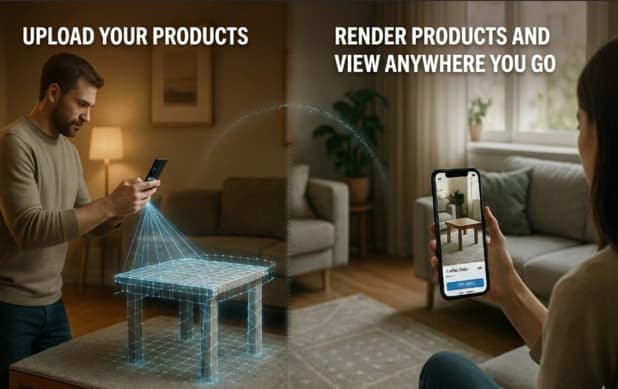 Marketplace
Marketplace Platform
Brands scan and publish their products to the SnapTap marketplace. Customers browse AR-enabled listings, visualize items in their real space, and contact sellers directly — no intermediary, no guesswork.
Seller Workflow
- Publish listings using SnapTap
- Reach customers actively exploring AR products
- Manage your catalog and toggle visibility anytime
- Receive direct customer inquiries from your listing (coming soon)
Customer Experience
- Browse AR-enabled products from multiple sellers
- See items true-to-scale in your own space
- Save favorites and compare before buying (coming soon)
- Message sellers directly without leaving the app (coming soon)
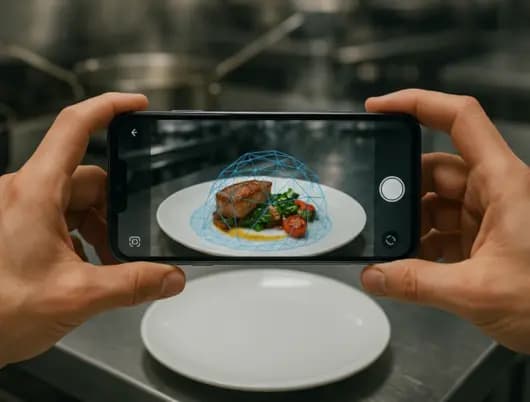 Restaurants
Restaurant Menu Virtualization
Convert your entire food menu into photorealistic 3D AR models. Guests scan a QR code on the physical menu and see every dish rendered life-size on their table — improving ordering confidence, reducing returns, and boosting upsells.
Seller Workflow
- Scan each dish and add it to your AR menu
- QR codes auto-generated for every dish
- Print QR codes directly on physical menus or table cards
- Update menu items anytime from your dashboard
Customer Experience
- Scan the QR code on a printed menu
- See the dish rendered life-size before you order
- No app download needed — works in any mobile browser
- Make confident choices without wondering about portion size
 Retail & E-Commerce
Business Product Virtualization
Furniture stores, showrooms, retail brands, and e-commerce businesses convert their product catalogs into AR. Embed the AR viewer on your own website, or hand out QR codes in-store — no app download required by customers.
Seller Workflow
- Convert full product catalogs to AR models
- Embed the AR viewer directly into your e-commerce site
- Print QR codes for in-store shelf tags and marketing materials
- Works for furniture, decor, electronics, fashion, and more
Customer Experience
- Place furniture and décor to scale in your actual room
- See how a product fits your space before purchasing
- No special device — any modern iPhone or Android is enough
- Dramatically reduces purchase uncertainty and returns
Everything Built Into the Platform
SnapTap handles the entire AR pipeline — scanning, processing, hosting and analytics — so you can focus on your products.
LiDAR-Powered 3D Scanning
Captures true depth, texture, and scale using iPhone Pro's built-in LiDAR sensor. Highly realistic models that accurately represent the real product.
Automatic Model Conversion
The scanned model is automatically converted to global format in the background.
Auto-Generated QR Codes
Every product instantly gets a unique QR code hosted on SnapTap's CDN. No QR tools required — print it, embed it, or share it directly from your dashboard.
Cross-Platform AR Viewer
The AR experience works natively: iOS uses Quick Look for seamless AR, Android uses Google Scene Viewer, and desktop shows an interactive 3D viewer — all from the same link.
Inventory Dashboard
Manage your entire AR product catalog from the SnapTap web dashboard and SnapTap Admin app. Toggle products active/inactive, update details, and monitor scan quotas — all from one screen.
Real-Time Notifications
Get notified when a product finishes processing, when conversion fails, and when customers leave feedback or ratings on your products (coming soon).
Embeddable AR Viewer
Each 3D model has a shareable URL you can iframe into any existing website or e-commerce store. Customers see and interact with the AR product without leaving your site.
View-Based Analytics & Billing
Every QR scan and model view is tracked. Monthly billing reflects your subscription base plus per-view charges beyond your plan — transparent and predictable.
Customer Ratings & Feedback (Coming Soon)
Customers can rate and leave written feedback on products they've experienced in AR. Ratings appear on product listings and notify the brand, building trust and social proof.
Plans That Grow with You
Each plan includes a monthly scan quota for adding new AR products. Billing is based on your subscription plus AR view volume — the more customers experience your products, the more value you get.
Starter
20 products
- Perfect for testing
- QR codes included
- Web-embeddable AR viewer
- Basic dashboard
Growth
50 products
- Most Popular
- Analytics & billing insights
- Priority support
- API access
Enterprise
80 products
- Unlimited AR products
- Dedicated account manager
- Custom integrations
- SLA-backed support
Need more? We also offer a fully Custom plan — set your own product limit (81+) and pay per product.
Zero Friction. Full Immersion.
Customers don't need an account, don't need to download anything. Scan a QR code and the AR experience launches in their native camera app — in seconds.
Scan the QR Code
Point any smartphone camera at the SnapTap QR code on the product, menu, or display.
3D Model Loads
A high-fidelity 3D model of the product loads instantly in the browser — no app, no login.
AR Launches Natively
iOS opens Apple Quick Look; Android opens Google Scene Viewer. The product appears in your real world, at exact scale.
Walk Around & Decide
Reposition, resize, and walk around the product. See it exactly as it would look in your space — then buy with confidence.
Ready to Bring Your Products Into the Real World?
Join businesses using SnapTap to deliver immersive AR product experiences that customers trust — and keep coming back for.